
- Dell UltraSharp 52 supports dividing the screen into up to four desktops
- Each virtual desktop measures 1536 x 2560 when split into four sections
- The panel uses IPS Black technology and supports variable 120Hz refresh rates
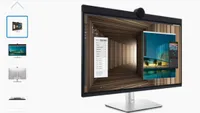
At CES 2026, Dell unveiled the 52-inch UltraSharp Thunderbolt Hub Monitor (U5226KW), measuring 48.16 inches wide with a panel marketed at 6144 x 2560 resolution.
According to the company, the screen can be divided into up to four distinct virtual desktops, allowing separate content spaces on the same display.
The sheer size of the monitor means users may need to move their head and neck frequently to view the entire screen comfortably.
Pixel density below the standard 6K
Despite its advertised 6K resolution, the horizontal and vertical pixel counts do not fully meet a standard 6K format, meaning it does not deliver the exact pixel density of a true 6K display.
Its listed pixel density is 129 pixels per inch, roughly comparable to that of a 32-inch 4K monitor.
When divided into four virtual desktops, each section measures 1536 x 2560, and when divided into three, each measures 2048 x 2560.
The monitor uses an IPS Black panel with support for variable refresh rates and a 120Hz refresh specification.
It supports wide viewing angles of 178 degrees both horizontally and vertically, and has a curvature of 4200R.
Native contrast is rated at 2000:1, and peak brightness is specified at 400cd/m².
For color coverage, it supports 99% of the DCI-P3 color gamut and 100% of both the sRGB and BT.709 gamuts, with calibration accuracy rated at E < 1.5.
Anti-glare and low-reflection treatments are applied to the screen surface, and low blue light and flicker-free technologies are included.
The business monitor also carries certifications, including TCO Certified 10.0, EPEAT Gold, and Energy Star compliance.
Connectivity options include two HDMI 2.1 ports capable of 6144 x 2560 resolution at 120Hz, two DisplayPort 1.4 ports, and a Thunderbolt 4 upstream connection with 40Gbps throughput.
In addition, there are three USB-C upstream ports and four USB-A downstream ports, along with two USB-C downstream ports offering up to 27W power.
An RJ45 2.5GbE Ethernet port and an integrated USB hub and KVM switch are also included.
Its stand allows adjustments in height, tilt, slant, and swivel, and the panel is VESA mount compatible.
The operating power consumption of this large monitor is 63.6W, with a peak draw of 430W.
It is compatible with Windows, Linux, Mac, and ThinOS and includes a three-year limited service with advanced exchange and premium panel replacement.
TechRadar will be extensively covering this year's CES, and will bring you all of the big announcements as they happen. Head over to our CES 2026 news page for the latest stories and our hands-on verdicts on everything from wireless TVs and foldable displays to new phones, laptops, smart home gadgets, and the latest in AI. You can also ask us a question about the show in our CES 2026 live Q&A and we’ll do our best to answer it.
And don’t forget to follow us on TikTok and WhatsApp for the latest from the CES show floor!

You must confirm your public display name before commenting
Please logout and then login again, you will then be prompted to enter your display name.